Posts for: #2023

Youyeetoo R1: RK3588S SBC with NFC and M.2 Sockets at an Affordable Price

Youyeetoo R1: RK3588S SBC with NFC and M.2 Sockets at an Affordable Price

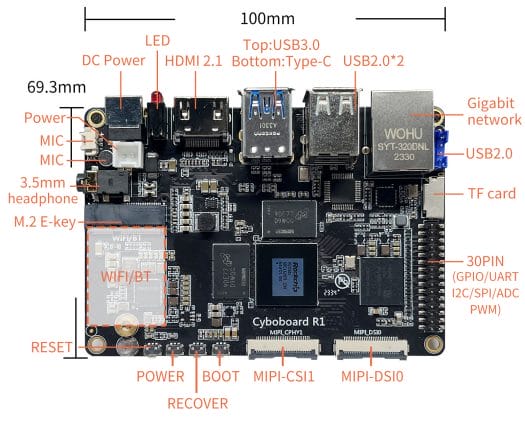
Youyeetoo has released the Youyeetoo R1, a feature-rich single-board computer (SBC) powered by the Rockchip RK3588S. The compact 100×69.3mm board offers two M.2 sockets for NVME/SSD or 4G LTE, a WiFi and Bluetooth connector, NFC support, four display interfaces, and two MIPI CSI camera interfaces.

The Youyeetoo R1 comes with various configuration options, including up to 32GB of RAM and 256GB of eMMC flash. The board also features a gigabit Ethernet port, five USB interfaces, a built-in microphone, multiple audio inputs/outputs, a 30-pin header for expansion, and HDMI input via an adapter connected to one of the MIPI CSI ports.

Specifications:

  • SoC: Rockchip RK3588S with octa-core processor (4x Cortex-A76 cores @ up to 2.2-2.4 GHz, 4x Cortex-A55 cores @ up to 1.8 GHz), Arm Mali-G610 GPU, 8Kp60 video decoder, and 6 TOPS NPU for AI acceleration
  • System Memory: 4GB, 8GB, 16GB, or 32GB LPDDR4x
  • Storage: 32GB, 64GB, 128GB, or 256GB eMMC flash, M.2 M-Key socket for NVMe or SATA SSD, MicroSD card socket
  • Video Output: HDMI 2.1 port up to 8Kp60 or 4Kp120, 2x MIPI DSI connectors up to 4Kp60, USB Type-C with DP1.4 support up to 8Kp30
  • Video Input: 2x 4-lane MIPI CSI connectors, optional HDMI input via RK628D adapter board
  • Audio: 3.5mm earphone jack with microphone, digital audio output via HDMI, on-board microphone, 4-pin header with R/L/GND/MIC, 2-pin header for microphone
  • Networking and connectivity: Gigabit Ethernet RJ45, M.2 E-Key socket for WiFi 5 and Bluetooth 5.0 module or WiFi 6 and Bluetooth 5.2 module, M.2 M-Key socket for 4G LTE module, NFC via external antenna
  • USB: 1x USB 3.0 Type-A port, 2x USB 2.0 Type-A ports, 1x USB 3.1 OTG Type-C port with DisplayPort Alt mode, 4-pin header with USB 2.0 interface
  • Expansion: M.2 2242 M-Key socket for PCIe/SATA SSD or 4G LTE module, M.2 2230 E-Key socket for WiFi & Bluetooth module, 30-pin GPIO header with various I2C, UART, CAN, PWM, ADC, SPI, and GPIO signals
  • Debugging: Debug UART connector
  • Misc: Power, Recovery, Reset, and Boot buttons, 2x red/green user LEDs, RTC battery connector, fan connector
  • Power Supply: 12V/3A via 5.5×2.1mm DC jack or 2-pin socket
  • Dimensions: 100 x 69.3 mm

The SBC supports Android 13, Debian 11, Ubuntu 22.04, and Buildroot, all based on Linux 5.10. The documentation for the board is still being developed, but previous reviews of Youyeetoo products have shown decent documentation quality.

The Youyeetoo R1 will be available at $99. Higher configuration options such as 8GB/64GB are available. 16GB/128GB and 32GB/256GB models expected to be released in the future.

Source: CNX Software – Embedded Systems News.
QEMU 8.2 Introduces New VirtIO-Sound & VirtIO-GPU “Rutabaga” Devices

QEMU 8.2, the latest update for the open-source processor emulator, has been released. This release brings several new features and improvements to the open-source Linux virtualization stack.

Some of the key highlights of QEMU 8.2 include:

  • Addition of a new VirtIO-Sound device that allows capture and playback from inside a guest using the audio backend of the host machine.

  • Introduction of a new VirtIO-GPU “Rutabaga” device, which enables various abstractions of GPU and display virtualization. This feature is primarily intended for use with the Android Emulator on QEMU and comes from the Android/CrosVM graphics stack.

  • Support for UFS (Universal Flash Storage) emulation through new ufs and ufs-lu devices.

  • P2P support for VFIO migration.

  • Preparation changes for the new IOMMUFD back-end.

  • Continued active development of RISC-V software support. QEMU 8.2 now supports several new RISC-V ISA extensions, virtual IRQs and IRQ filtering, and RISC-V vector crypto v1.0.

  • Improved emulation for QEMU’s 68k Macintosh Quadra 800, allowing it to boot MacOS 7.1, A/UX 3.0.1, Linux, and NetBSD 9.3.

  • Addition of new Arm CPU types, including Cortex-A710 and Neoverse-N2. QEMU also provides support for emulating newer ARM architecture extensions.

  • QEMU on LoongArch now supports the LASX and PRELDX instructions, along with support for 4K page sizes and ongoing LoongArch enablement work.

  • HAX(M), the Hardware Accelerated Execution Manager, is no longer supported by QEMU since Intel discontinued its development earlier this year.

For more information and downloads, you can visit the QEMU 8.2 feature release page on wiki.qemu.org.

Source: Phoronix.

Sophgo SG2380 RISC-V SoC Expands RAM Support to 96GB, Adds PCIe and 25 GbE

Sophgo SG2380 RISC-V SoC Expands RAM Support to 96GB, Adds PCIe and 25 GbE

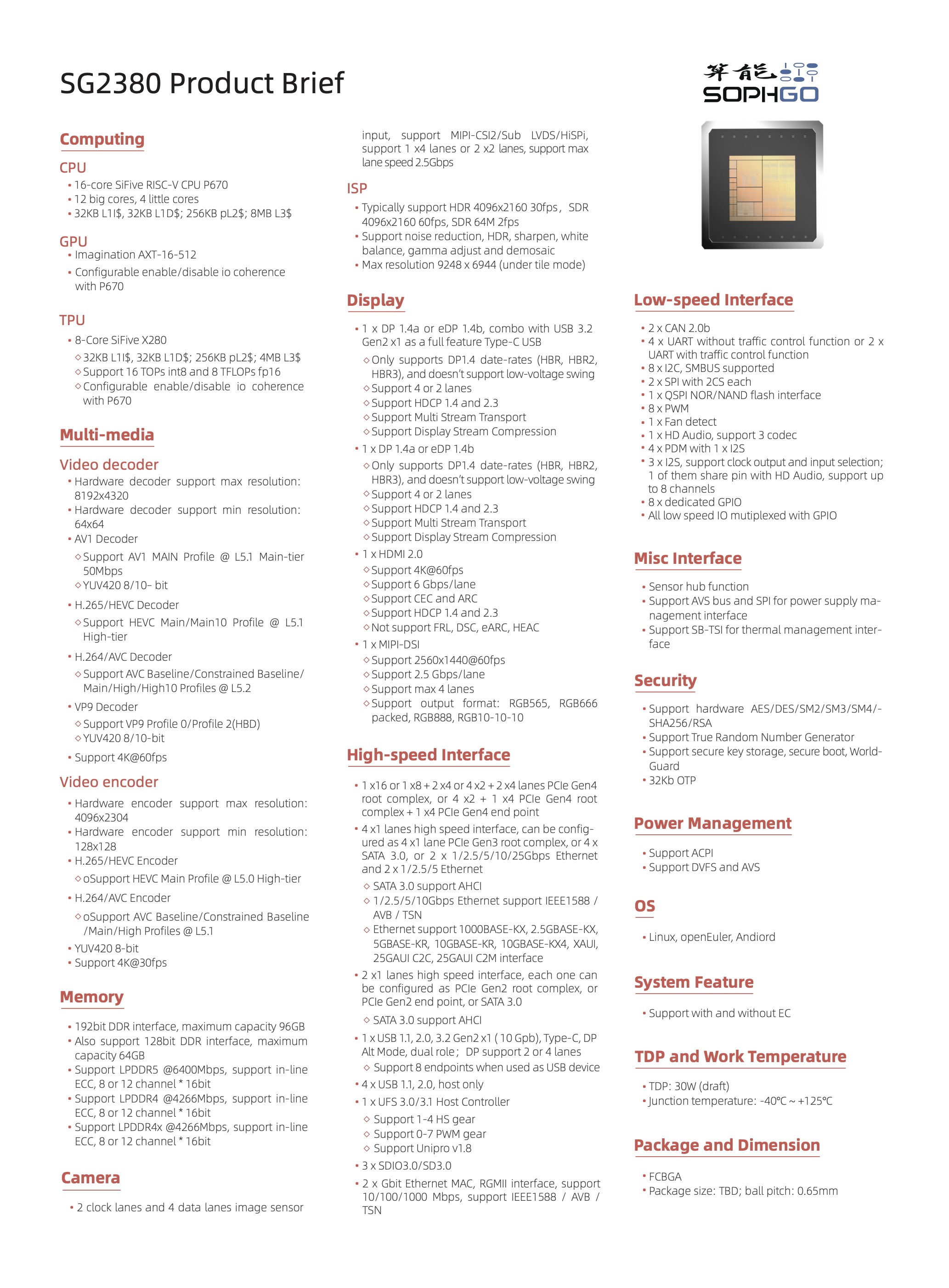
The Sophgo SG2380 RISC-V SoC has received an upgrade, according to a recent announcement by Milk-V. The SoC, which was previously announced in October, now supports up to 96GB of RAM, an increase from the previous limit of 64GB. The memory is now using a 192-bit interface. Additionally, the SG2380 has been upgraded with an additional PCIe x16 lanes and now supports up to 25 Gbps Ethernet. Milk-V has shared the upgraded specifications of the Sophgo SG2380 SoC on their website.

Overall, the upgraded capabilities of the Sophgo SG2380 RISC-V SoC are promising, and it will be interesting to see how it performs when it becomes available in the future.

Source: Phoronix.

Kubernetes v1.29: Introducing Mandala

Kubernetes v1.29: Introducing Mandala

Kubernetes has announced the release of version 1.29, named Mandala (The Universe). This release introduces new stable, beta, and alpha features, continuing the tradition of delivering top-notch releases. The v1.29 release includes 49 enhancements, with 11 graduating to Stable, 19 entering Beta, and 19 graduating to Alpha.

Some of the stable improvements in v1.29 include:

  • ReadWriteOncePod PersistentVolume access mode, which allows multiple pods on the same node to read from and write to the same volume.
  • Node volume expansion Secret support for CSI drivers, which allows secrets to be sent as part of the node expansion process.
  • KMS v2 encryption at rest, which provides improvements in performance, key rotation, health check & status, and observability for encrypting persisted API data.

Beta improvements in v1.29 include:

  • QueueingHint feature for optimizing the efficiency of requeueing in the scheduler.
  • Separation of node lifecycle from taint management, allowing for more granular control over taint-based pod eviction.
  • Clean up for legacy Secret-based ServiceAccount tokens, marking them as invalid if they have not been used for a long time.

Alpha features in v1.29 include:

  • Defining Pod affinity or anti-affinity using matchLabelKeys, improving calculation accuracy during rolling updates.
  • nftables backend for kube-proxy, providing a new backend based on nftables for packet filtering and processing.
  • APIs to manage IP address ranges for Services, allowing for dynamic allocation and resizing of IP ranges.
  • Support for image pull per runtime class in containerd/kubelet/CRI, enabling the pulling of different images based on the runtime class specified.
  • In-place updates for Pod resources for Windows Pods, allowing for changes to the desired resource requests and limits without restarting the Pod.

The release also includes the graduation of 11 enhancements to Stable, the deprecation of in-tree integrations with cloud providers, the removal of the v1beta2 flow control API group, the deprecation of the status.nodeInfo.kubeProxyVersion field for Node objects, and the removal of legacy Linux package repositories.

Kubernetes v1.29 is available for download on GitHub, and users can get started with Kubernetes using interactive tutorials or by running local clusters using minikube. The release team, consisting of dedicated community volunteers, has worked hard to deliver this release, with contributions from 888 companies and 1422 individuals during the 14-week release cycle.

For more details about the v1.29 release, including the full list of enhancements and graduations, users can refer to the release notes.

Rust Guest Tools 0.3.0: Enhancing Virtualization Experience

XCP-ng has released version 0.3.0 of its Rust guest agent for Linux and BSD operating systems. This release includes several new features and bug fixes.

One major change is the addition of APT repositories, allowing for easy installation and updates of the guest agent on Debian-based systems. The Debian package is automatically built on Gitlab and can be accessed via a Debian repository.

The agent now has the ability to collect available and total guest memory inside FreeBSD guests. Additionally, the command line for the agent now includes two extra arguments, --stderr and --loglevel, for troubleshooting assistance. All guest agent logs are now sent to syslog by default on any Unix-like operating system.

Bug fixes include resolving an issue with plugging and unplugging a virtual NIC while the VM is online, thanks to community testing and feedback. Another bug fix removes a requirement on the libxenstore.so development symlink, now only requiring the runtime library package.

For more details, the complete changelog can be found here.

README Highlight Issue #50, 2023: memos

README Highlight Issue #50, 2023: memos

In this week’s issue of README Highlight (#50, 2023), we are taking a look at the following project: memos.

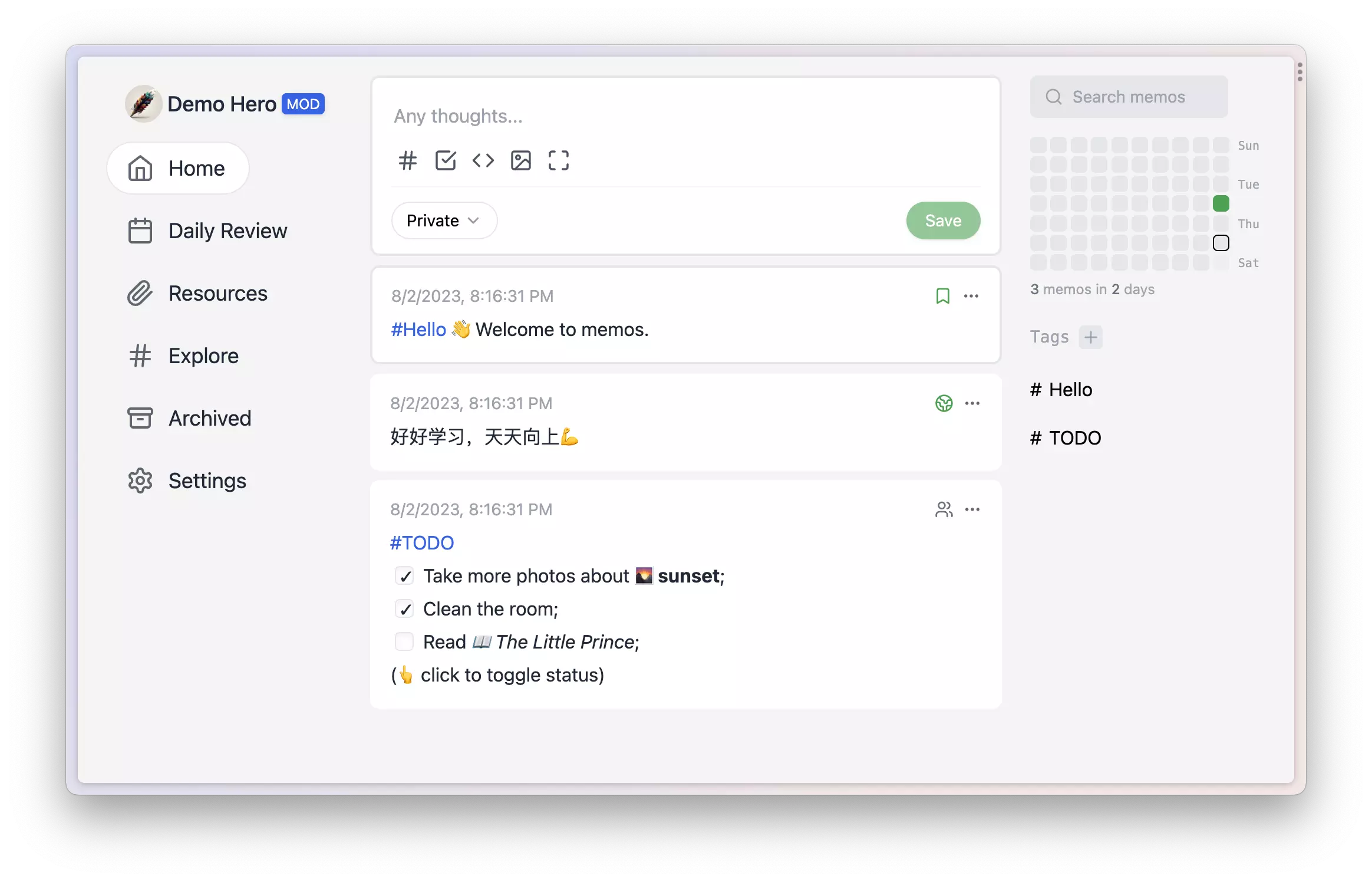
The memos project is a privacy-first, lightweight note-taking service that allows users to easily capture and share their great thoughts. It is designed for individuals who value their privacy and prefer a minimalist approach to note-taking.

Some key points about memos include:

  • Open source and free forever: memos is an open-source solution that is available for free, ensuring that creativity knows no boundaries.
  • Self-hosting with Docker in just seconds: With Docker, users can easily deploy memos and have full control over their data and privacy.
  • Pure text with added Markdown support: memos focuses on simplicity by providing a pure text interface with support for Markdown formatting.
  • Customize and share notes effortlessly: memos offers intuitive sharing features that allow users to collaborate and distribute their notes with others.
  • RESTful API for third-party services: memos provides a RESTful API that enables integration with other services, opening up new possibilities.

To deploy memos with Docker, users can use the following command:

docker run -d --name memos -p 5230:5230 -v~/.memos/:/var/opt/memos ghcr.io/usememos/memos:latest

The ~/.memos/ directory serves as the data directory on the local machine, while /var/opt/memos is the directory of the volume in Docker and should not be modified.

Contributions to the memos project are greatly appreciated, as they help make the open-source community a vibrant place to learn, inspire, and create.

The project has also gained popularity and has been contributed to by various developers. Some notable contributions include:

In conclusion, memos is a privacy-focused note-taking service that offers a simple and customizable experience. With its open-source nature and support for Docker deployment, memos provides users with full control over their data and privacy. Whether you are a developer, a DevOps enthusiast, or someone who enjoys maintaining a home lab, memos can be a valuable tool for capturing and sharing your thoughts.

Source: memos README.