Posts for: #raspberry-pi-5

Raspberry Pi Unveils PCIe FFC Connector and New HAT+ Specifications

Raspberry Pi Unveils PCIe FFC Connector and New HAT+ Specifications

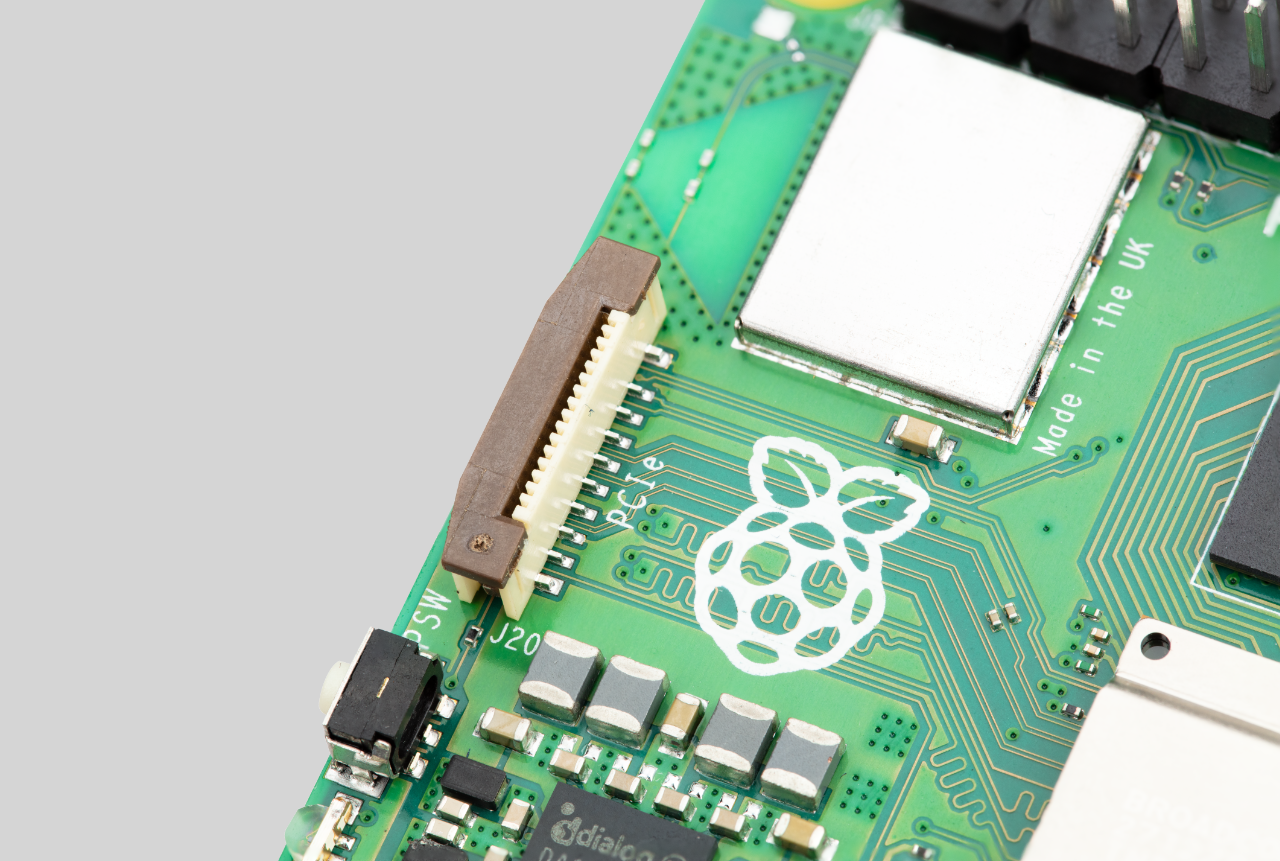
One of the most notable features of the new Raspberry Pi platform is its small, vertical, 16-way FFC (Flat Flexible Cable) connector on the left-hand side of the board. This connector exposes a single-lane PCI Express interface.

The Peripheral Component Interconnect Express (PCI Express or PCIe) is a board-level interconnect that enables high-speed data transfer between a processor chip and external peripherals such as NVMe SSDs, Ethernet cards, and AI/ML accelerators. PCIe achieves this by serializing data transfers and sending one bit at a time down a single channel. Each channel consists of one or more differential pairs on the PCB, which are controlled waveguides made by closely spaced wires. In the case of a single-lane PCIe interface, there is a single transmit pair, a single receive pair, and a clock pair, requiring three differential pairs and six wires. The Raspberry Pi 5, based on the BCM2712 processor, is connected to the RP1 I/O controller via an ×4 interface.

The PCIe specification also requires sideband signals such as reset, clock request, and wakeup. The 16-way connector on the Raspberry Pi provides all these signals, along with two pins for controlling board power and automatically detecting a properly designed PIP (PCIe Peripheral) by the Raspberry Pi firmware.

Instead of adding an M.2 connector to the Raspberry Pi 5, which would be large, relatively expensive, and require a 3.3V, 3A power supply, the Raspberry Pi team opted for a small, low-cost FFC connector. This allowed them to provide a PCIe interface without increasing the board size or imposing additional costs on users.

At the launch of the Raspberry Pi 5, the team did not have a specification for building peripherals that attach to the 16-way PCIe connector. They wanted to thoroughly test their own prototype product and consider the interaction of PCIe peripherals with Raspberry Pi power states and firmware. They have now released the first revision of the specification and are in the final stage of prototyping their own M.2 M Key HAT+. This HAT+ will be launched early next year.

In addition to the PCIe connector specification, the Raspberry Pi team has also released a preliminary version of the new HAT+ specification. The original HAT specification, written in 2014, is in need of an update. The new specification simplifies certain aspects, including the required EEPROM contents, and consolidates everything into one document. It also adds new features. While there is still work to be done on this standard and the EEPROM utilities have not been updated, this release provides a glimpse into the changes in the HAT standard.

The Raspberry Pi team wanted to ensure that the HAT+ standard is developed correctly, as it is expected to be in use for as long as the old HAT standard. They believe that PCIe boards (PIPs) that go on top of the Raspberry Pi should be HAT+ boards, and their own M.2 HAT+ will adhere to this standard.

More information can be found in the first revision of the Raspberry Pi Connector for PCIe datasheet, and the Raspberry Pi HAT+ Specification datasheet.

Pimoroni NVMe Base: A $14 M.2 Connector Add-On for Raspberry Pi 5

The Raspberry Pi 5 is a new single-board computer from Raspberry Pi, featuring an updated processor that is twice as fast as the chip in the Raspberry Pi 4. One of the notable changes in the new board is the inclusion of a single-lane PCIe 2.0 connector, which allows users to add a PCIe NVMe SSD. However, the Raspberry Pi 5 itself does not have an M.2 connector, so additional hardware is required for this functionality. While Raspberry Pi plans to release its own daughter boards next year to add M.2 SSD support, third-party companies have already started offering options.

Pineberry Pi recently introduced the HatDrive! Top and Bottom add-on boards for the Raspberry Pi 5, providing support for PCIe NVMe SSDs. The bottom board supports M.2 2232/2242 cards and is priced at €20 ($22), while the top board, which supports up to an M.2 2280 SSD, costs €26 ($28).

Now, Pimoroni has unveiled the NVMe Base, which is a cheaper option at just over $14. Although it is not yet available, Pimoroni says the base will be released soon, and interested customers can sign up to be notified when it becomes available.

The NVMe Base is designed to be mounted to the bottom of a Raspberry Pi 5 and connects to the computer via a flex cable. It supports M.2 2232, 2242, and 2280 SSDs with speeds up to 800MB/s, thanks to its support for PCIe 3.0. It is important to note that the Raspberry Pi 5 officially supports only PCIe 2.0, which delivers approximately half the speed. However, adding an NVMe SSD to the Raspberry Pi 5 should still provide significantly faster read/write speeds compared to a microSD card and support for drives up to 4TB.

Source: Liliputing.

Raspberry Pi 5 Introduces 5G Modem HAT with Quectel RM502Q-AE M.2 Module

Sixfab has introduced a 5G Modem Kit designed for the Raspberry Pi 5, featuring the Quectel RM502Q-AE 5G Sub-6GHz M.2 module, a proprietary internal antenna for Sub-6 frequency bands, and a USB 3.0 bridge connector. The Sixfab 5G Modem Kit for Raspberry Pi 5 includes a variety of specifications:

  • Sixfab 5G Modem HAT for Raspberry Pi 5
    • M.2 socket for 5G module
    • Nano SIM card holder + embedded SIM
    • USB 3.0 port and 40-pin GPIO header for connection to the Raspberry Pi 5 SBC
    • Misc
      • User button
      • Status, power, and user (GPIO21) LEDs
      • EEPROM for Raspberry Pi HAT compliance
      • 2-pin fan connector
    • Power Supply – 5V via USB Type-C port (on HAT itself)
    • Dimensions – 88.1 x 57.7 x 21.7 mm
    • Approvals – FCC, IC, CE, UKCA are in progress
  • Quectel RM502Q-AE M.2 module
    • 5G NR: 3GPP Release 15 NSA/SA operation, Sub-6 GHz
    • LTE Category: DL Cat 20/ UL Cat 18
    • Max data rates
      • 5G SA Sub-6 – Max. 4.2 Gbps (DL)/Max. 450 Mbps (UL)
      • 5G NSA Sub-6 – Max. 5 Gbps (DL)/Max. 650 Mbps (UL)
    • Host interfaces – USB 3.1 or PCIe 3.0
    • Dimensions – 52 x 30.0 × 2.3mm
    • Weight – 8.4 grams
  • Extra tall 40-pin GPIO stacking header
  • Power Supply – 5.1V 3.0A DC power adaptor with universal plugs
  • Plastic spacer kit

The kit, priced at $450, is compatible with various boards and computers, including the NVIDIA Jetson Nano Developer Kit, Beaglebone SBC, Asus Tinkerboard, NXP i.MX 8 devkits, and regular PCs, offering drivers and tools for both Windows and Linux. Additional components required for operation include a Raspberry Pi 5, a microSD card for the OS, a 5G SIM card (unless using the eSIM is an option), and an extra 5V USB-C power supply to separately power the Raspberry Pi 5 and Sixfab HAT.

Source: CNX Software – Embedded Systems News.

PineBerry Pi HatDrive: M.2 PCIe HAT for Raspberry Pi 5

PineBerry Pi has launched the HatDrive! Top M.2 HAT for Raspberry Pi 5, which takes advantage of the FPC PCIe connector. The HatDrive features an M.2 Key-M socket with a PCIe x1 interface, supporting 2230 and 2242 modules. This allows users to install an SSD, AI accelerator, or other compatible M.2 modules. The HAT is connected via a 40mm long 16-pin FPC cable, which supports up to PCIe Gen3. It also utilizes the 40-pin Raspberry Pi GPIO header for the I2C EEPROM required by compliant HATs, power supply monitoring and diagnostics, and the ability to stack another HAT on top if necessary. The package includes spacer pins, M2.5 screws, a spacer pin for M.2 card mounting, and an optional male-female HAT connector.

Additional specifications of the PineBerry Pi HatDrive include:

  • Voltage regulator delivering up to 3A for the 3.3V power rail, compliant with M.2 (NGFF) standard.
  • Installation of M.2 disks in 2230 or 2242 format thanks to a dedicated metal bracket (custom CNC made).
  • Misc – 2 LED lights for power supply voltage (“PWR”) and M.2 disk activity (“ACT”).
  • Power Supply:
    • Via FPC PCIe ribbon (providing a minimum of 5W continuous power)
    • Via 40-pin HAT connector
    • Monitoring – Real-time monitoring and diagnostics of the power supply bus, measuring voltage, current, and power parameters via an I2C interface
  • Dimensions – 65 x 56.50 mm (4-layer PCB, Raspberry Pi HAT compliant)

PineBerry Pi is planning to manufacture 5,000 units of the HatDrive and is currently accepting pre-orders for €20, with shipping scheduled to begin in early December.

Additionally, PineBerry Pi offers the “HatDrive! Bottom,” which is larger (90 x 56 mm) and meant to be connected on the bottom side of the Raspberry Pi 5. It supports M.2 2230, 2242, and 2280 NVMe SSDs. The HatDrive! Bottom includes an extra through 5V 4-pin connector as a redundant power supply (up to 2A at 5V). It can be pre-ordered for €25.99.

Source: CNX Software – Embedded Systems News.

How to Create a File Server using Raspberry Pi 5

In The MagPi 134, Alasdair Allan, Head of Documentation, expressed excitement about the possibility of low-power NAS boxes utilizing the M.2 HAT on the Raspberry Pi 5. Here are the basic steps for setting up a file server.

01. Software setup

Begin by installing Samba onto Raspberry Pi OS with the following command:

sudo apt install samba samba-common-bin

To ensure compatibility with other operating systems, install NTFS for the shared drive:

sudo apt install ntfs-3g

02. Storage setup

While an external hard drive is typically used, using an SSD drive is similar. Plug in the SSD drive, format it if necessary, and mount it to Raspberry Pi OS. To automount the drive on boot, edit the fstab file with the command sudo nano /etc/fstab and add a line similar to the following:

/dev/sdb1 /mnt/location ntfs nls-utf8,umask-0222,uid-1000,gid-1000,rw 0 0

03. Configuration

The Samba configuration file is where the magic happens, allowing you to open up shared storage to the network. Here is an example configuration:

[share]
Comment = Network share
Path = /mnt/location
Browseable = yes
Writeable = yes
only guest = no
create mask = 0777
directory mask = 0777
Public = yes
Guest ok = yes

By following these steps, you can build a file server using the Raspberry Pi 5 and take advantage of its new features for a more efficient NAS setup.

Source: News - Raspberry Pi.

The Official Raspberry Pi Beginner’s Guide, 5th Edition - Now Available

The Official Raspberry Pi Beginner’s Guide, 5th Edition is now available, according to an announcement from Raspberry Pi. This fifth edition of the flagship book about the Raspberry Pi offers new coverage of the Raspberry Pi 5, Raspberry Pi Zero 2 W, and the most recent version of Raspberry Pi OS. In addition, the author, Gareth Halfacree, has included a bonus chapter that covers Raspberry Pi Pico and Pico W.

The book features a new look, with an interior design from Sara Parodi. Nellie McKesson developed an HTML- and CSS-based layout engine to bring the design to life. The book also includes new graphics, including photography from Brian O Halloran, diagrams from Natalie Turner, and illustrations from Sam Alder. The process was overseen by Liz Upton, Jack Willis, and Brian Jepson.

The Official Raspberry Pi Beginner’s Guide, 5th Edition can be ordered from the Raspberry Pi Press Store. Raspberry Pi users running Raspberry Pi OS can expect it to appear in the Raspberry Pi Bookshelf application in a few days.