Posts for: #single-board-computer

Orange Pi 5, 5B, and 5 Plus SBCs Now Available with 32GB RAM

Orange Pi has released new versions of its single board computers, the Orange Pi 5, Orange Pi 5B, and Orange Pi 5 Plus, with 32GB of RAM. These boards are powered by the Rockchip RK3588S or RK3588 octa-core Cortex-A76/A55 SoC. The addition of 32GB RAM is the only change made to the boards. Pre-orders are currently available on Amazon, with shipping scheduled to start by October 31.

Source: CNX Software – Embedded Systems News.

Designing the Raspberry Pi 5: Insights from James Adams and Eben Upton

Raspberry Pi has recently released the highly anticipated Raspberry Pi 5, and it’s been a culmination of years of hard work and decision-making. In an interview with Eben Upton, the co-founder of Raspberry Pi, James Adams dives deep into the design process behind this new iteration of the popular single-board computer. The conversation between Adams and Upton is lengthy and comprehensive, covering all aspects of the design process. For those who prefer watching, there is a video available on the Raspberry Pi YouTube channel.

For more information on the design process of the Raspberry Pi 5, visit the Raspberry Pi website.

Introducing the Raspberry Pi 5: Up to 3x Performance and PCI Express Support

The highly anticipated Raspberry Pi 5 has been announced, boasting significant performance improvements and new features. Priced at $60 for the 4GB variant and $80 for the 8GB variant, the Raspberry Pi 5 offers a no-compromises user experience. It features a 2.4GHz quad-core 64-bit Arm Cortex-A76 CPU, a VideoCore VII GPU supporting OpenGL ES 3.1 and Vulkan 1.2, dual 4Kp60 HDMI display output, a 4Kp60 HEVC decoder, and dual-band 802.11ac Wi-Fi with Bluetooth 5.0. Additionally, it includes two USB 3.0 ports, two USB 2.0 ports, Gigabit Ethernet with PoE+ support, and a PCIe 2.0 x1 interface for fast peripherals.

In a home lab context, the Raspberry Pi 5 is a powerful and affordable option for enthusiasts to create their own server. The improved performance makes it ideal for running virtual machines, hosting websites, and running containers. With its PCIe 2.0 interface, enthusiasts can connect fast peripherals such as NVMe SSDs, expanding storage capabilities for server applications. The dual 4Kp60 HDMI output and the 4Kp60 HEVC decoder are useful for media server applications, allowing for smooth streaming of high-resolution content. The inclusion of Gigabit Ethernet with PoE+ support further enhances its server capabilities, simplifying power management for networked devices.

For server use enthusiasts, the Raspberry Pi 5 offers a reliable and cost-effective platform for various applications. The improved CPU and GPU performance allow for faster processing and rendering, making it suitable for tasks such as data analysis and media transcoding. The inclusion of a PCIe 2.0 interface opens up possibilities for connecting high-speed peripherals, such as network cards or storage devices, to enhance server performance and expand storage capacity. The dual-band 802.11ac Wi-Fi and Bluetooth 5.0 support provide flexibility for wireless connectivity options in server setups. Overall, the Raspberry Pi 5’s upgraded specifications make it a compelling choice for enthusiasts looking to build and customize their own server for various server use cases.

The Raspberry Pi 5 is available to pre-order today, and is expected to by the end of October 2023.
Four Useful Single-Board Computers for Homelabs

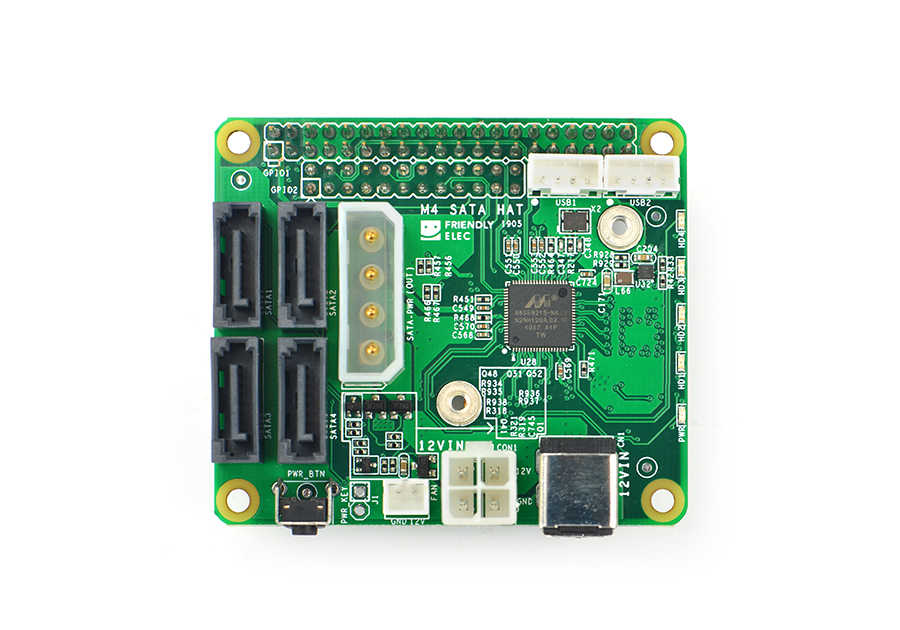
I’ve assembled a list of useful single-board computers (SBCs) for use in home labs. They are essentially low-power computers useful for lightweight tasks and experimentation. I’ve used them (and still do) for certain tasks, especially when I’ve wanted to experiment with various things on the ARM64 platform. FriendlyARM Nano-Pi M4 (6 ARM64 cores, 2/4GB LPDDR3/LPDDR4 RAM) – a handy board for storage applications. It features a PCI Express interface, allowing for multiple SATA ports using the SATA hat or an NVMe drive using the NVMe hat.
Read more →

Make NVIDIA Jetson Nano Developer Kit Headless

This tutorial will show you how to easily remove the desktop interface from your NVIDIA Jetson Nano Developer Kit to run it in headless mode. This can be useful for using the NVIDIA Jetson Nano as a small, low-power server with machine-learning capabilities. The NVIDIA Jetson Nano is a mighty little single-board computer with a Quad Core ARM64 CPU, 4GB LPDDR4 RAM, and a 128-core NVIDIA Tegra (Maxwell-based) GPU, all while using as little as 5 watts.
Read more →

Compile ZFS on Linux 0.8.2 with Native Encryption on ARM64

Compile ZFS on Linux 0.8.2 with Native Encryption on ARM64
This article will show how to compile ZFS on Linux 0.8.2 on Ubuntu 18.04 on ARM64, specifically the FriendlyElec NanoPi M4 single board computer, which has a four-port SATA HAT available. It also works great on other single-board computers, and I’ve successfully compiled and used ZFS on the Raspberry Pi. These instructions will likely work on other architectures supported by ZFS on Linux, such as x86_64. Install ZFS build requirements Use apt to install the packages needed to build ZFS 0.
Read more →